'Show By' Functionality
Data displayed in the grid can be changed completely by using the Show By functionality. It was implemented in order to view detailed information of records of a specified domain. By default, records of selected domains are displayed, but they can also be changed to the records of some specific sub-domain (subject) if needed.
For example, if you are working with the Patient Master domain but want to see information of the Person Address Master sub-domain (subject), you will need to select the appropriate item from the Show By drop-down list, as shown in the following image.
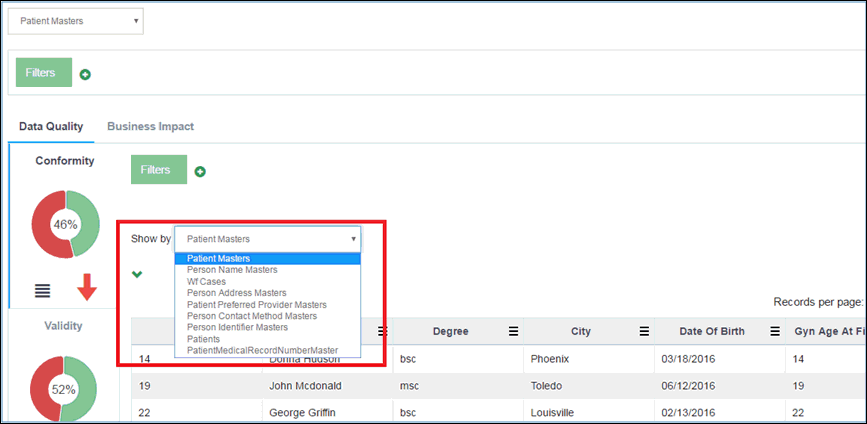
All items that are displayed in the drop-down list are sub-domains of the selected domain. The list can be modified through the Administration menu.
For more information, see Configuring Fields for 'Show By' Functionality.
Once a sub-domain is selected, the grid is redrawn and the selected sub-domain will display the new data, as shown in the following image.
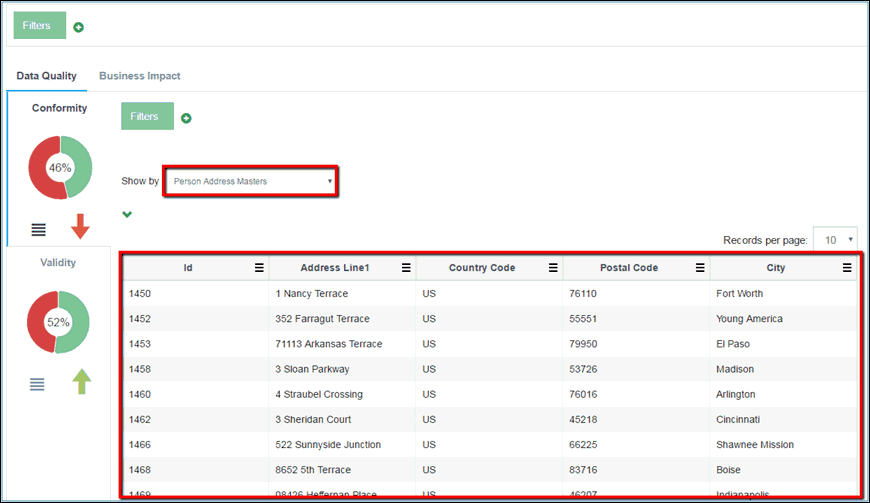
All records of the selected sub-domain (subject) that exists for the currently selected domain are displayed in the grid.
The columns that appear can be configured the same way as the domain tables. For more information, see Configuring Fields for the Grid.