Using Grids
The most important component of DQM is the grid. It contains all of the data that is in the system and by which dimensions and/or measures are being calculated.
The following image shows the structure of the grid, and is followed by a list and description that corresponds to a specific in the grid.
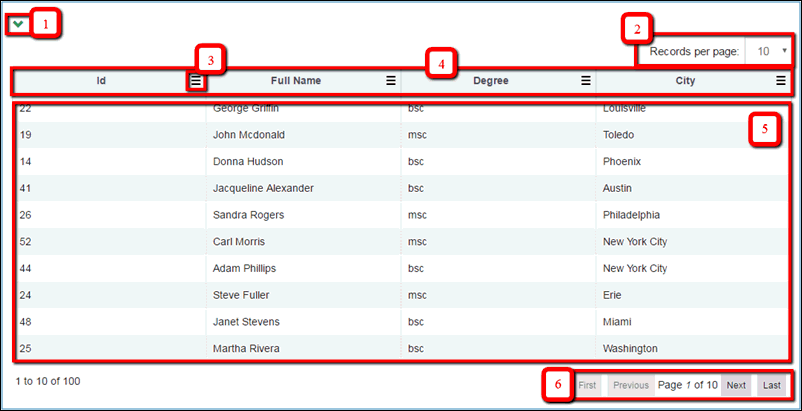
- Expand/Collapse control. Allows you to hide or show the grid.
- Paging component header. Allows you to define how many records per page to be displayed in the grid.
- Filtering button. Allows you to filter date by column in the grid.
- Headers. Names of the displayed columns.
- Rows. Contains data.
- Paging component footer. Allows you to navigate between pages.
Columns of the grid can be configured through the Administration menu. For more information, see Configuring Fields for the Grid.
The grid provides you with the following functionalities:
- Sort by data column. When you click a column header, data will be sorted in ascending order. When you click it a second time, data will be sorted
in descending order. Clicking a third time discards sorting.
When data is sorted by column, the sorting icon appears, as shown in the following image.
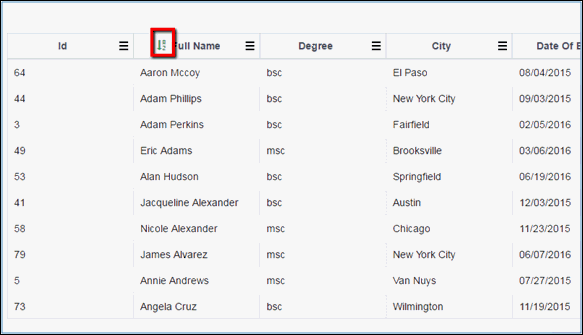
Note: If the data of the column consists of more than one word, then data will be sorted by the first letters of any of the words available. For example, in the image above, Eric Adams is listed before Alan Hudson because "Adams" comes alphabetically before "Alan".
- Filter data by column. In order to sort data in the grid by a selected column, click the filtering button from the necessary column header.
The field for entering the filtering criteria is displayed. Data is filtered dynamically as you enter data, as shown in the following image.
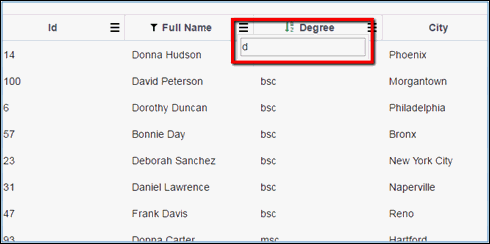
Note: Same as for sorting, if data of the column consists of more than one word, then data is filtered by the first letters of any of the words available. For example, from the image above, both 'David Peterson' and 'Frank Davis' contain the letter 'd', so they both satisfy the filtering criteria.
When filtering is applied, the filter icon appears, as shown in the following image.
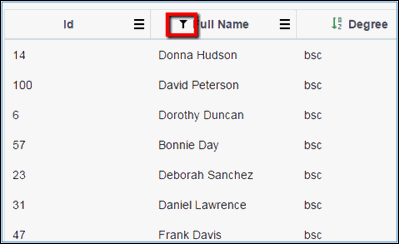
Filtering by multiple columns are supported. The filtering icon will appear on each column using a filter.