Omni Governance Console
|
Topics: |
Omni-Gen includes a portal named Omni Governance Console (OGC). OGC hosts several Omni-Gen web applications, including the 360 Viewer and Remediation portal.
New Features
This section describes new feature in Omni Governance Console (OGC) version 3.2 and higher.
- Enhanced Grouping Functionality
In Omni-Gen version 3.8.2, the Grouping feature is disabled by default. To enable Grouping in OGC:
- Log on to the WSO2 Identity Server Management Console.
- In the left pane, click the Main menu, expand the Entitlement section, and then click Policy Administration, which is located under the PAP node.
- Locate the component-access-menuitem-policy row in the Available Entitlement Policies list, and then click Edit for this row.
- Locate the Grouping section and uncomment the following rule:
<Rule Effect="Permit"...
- Click Save Policy.
- For the component-access-menuitem-policy row in the Available Entitlement Policies list, click Publish to My PDP.
- Select the Update Policy radio button, and then click Publish.
- Confirm that you want to publish.
- Log out of OGC and then log in.
The Grouping feature is now available and displays as a tab in the OGC menu. For more information, see the Omni-Gen Grouping User 's Guide.
- Email Notification of Remediation Ticket Assignment
This feature allows an email notification to be sent to a user who has been assigned with a remediation ticket.
- Improved Navigation to a Field Requiring Manual Cleansing for Remediation Purposes
You can use the new Expand All Activities and Hide All Activities buttons to immediately locate any fields that require editing for Manual cceansing.
- Email Notification of New Ticket Creation
This feature allows an email notification to be sent to the assigned user when a new Manual Cleansing ticket is created. A second variant of this operation allows for all email notifications to be sent to a single user ID.
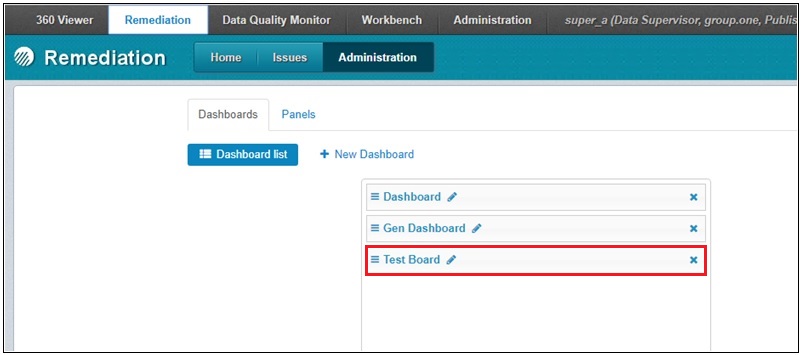
- Remediation Dashboard Template
To provide assistance when creating Remediation dashboards, a dashboard template called Test Board is now available, which is available under the Dashboards tab in the Administration section of the Remediation portal, as shown in the following image.
- New Omni-Gen Installer
Manually configuring a properties file for Omni-Gen and installing the OGC separately have been replaced by the new Omni-Gen installer, which prompts you for all configuration settings and then automatically installs (or upgrades) Omni-Gen Server and OGC.
- Data Quality Monitor and Data Quality Workbench Applications
OGC now serves as a portal to the new Data Quality Monitor and Data Quality Workbench applications.
- Automatic User Role Configuration From Active Directory Through LDAP
Eliminates duplicate manual entry of OGC users and their privileges by extracting Group Membership data directly from Active Directory (AD) systems through LDAP protocol connections.
- Expand All Command
Capability to expand nested Subjects in Remediation, Master Comparison exploration.
- Create New Document
You have the ability (optional) to create a new document directly from the OGC Data Stewards session.
Known Issues
|
Topics: |
This section describes known issues in Omni Governance Console (OGC) version 3.2 and higher.
Omni Governance Console Grouping Unavailable
An issue has been reported in some deployments when using Oracle as a database repository, where the runtime initialization of Grouping components does not create the required tables. A solution to isolate and resolve this issue is being worked on as it appears to be dependent on some Oracle nuances. As a workaround, if you are signing in as a user with permissions to see the Grouping feature, but are not seeing it in the Omni Governance Console (OGC), then perform the following steps:
- Stop the Omni Governance Console (OGC) Service.
- Use the database management tool applicable to your Oracle system and connect to the Omni-Gen database.
- Check if the group_node and subject_group tables exist.
- If the tables do not exist, execute the Oracle script, Group_Node_n_Subject_Group_Create_v2.sql, which is attached to this PDF for your convenience. The script will create the necessary tables and procedures. Some client
tools might require you to run each piece of the script, such as create table and create procedure, separately.
Note: If you notice that the tables do exist, then there is an unrelated issue to this case, and it should be reported to Customer Support Services.
- Start the OGC.
- Sign in to the OGC. The Grouping should be available.
Note: If you perform a bundle replace operation or environment reset, you will need to rerun the script above to regenerate the tables, since those two actions remove the tables.
OGC Sync of Model to Metadata and WS02 Roles
The "sync of Model to Metadata and WS02 Roles" mistakenly creates a Metadata table for cases and instances, and automatically "Includes" them as Links displayed below the SubjectMaster table Full Info View. This causes the "cases" (and "instances") link to be displayed, and since the Table is not a valid subject or sub-collection, clicking it will cause a system error. This will be resolved in a future release.
As a workaround, you can follow the steps below.
- At the completion of the SYNCH process, click Apply Changes.
- From the OGC, click the Administration tab, and then select the Tables option.
- From the Tables option, select your Master, then select the EditTables option, and then select the Full Info View option.
- Move the cases and instances from Included to Excluded by clicking the X next to each.
- Click Update.
- Return to the Omni-Gen Console applications.
SYNCH Process
The normal behavior of the SYNCH process is to examine a newly deployed Omni-Gen model, create a list of Subjects in that model, and compare that list with the existing tables in the metadata for OGC (consisting of a runtime H2 database and its offline MData.xml file). Currently, in Omni-Gen™ Master Data Management (MDM) Edition and Data Quality (DQ) Editions, if the Subject exists in the model, but not in the metadata, then the SYNCH process creates a subject table and a subjectMaster table in the metadata. However, in the DQ Edition, there are not any subjectMasters or subjectMaster tables. When later referenced, the presence of a subjectMaster table generates an error when any OGC application (for example, Remediation) is started.
Workaround (required for DQ Editions only):
- After you run the SYNCH process, sign in to OGC.
- Click the Administration tab.
- Click Tables.
- Examine the list of tables, and delete any subjectMaster tables.
- Click Update, which is located at the bottom of the screen.
- Click the corresponding tab of an OGC application (for example, the Remediation tab).
Notice that no error is generated (specifically, Error 500) and the selected OGC application is operating as expected.
Mastered Subject (Domain) Name Length Limit
Omni-Gen Versions 3.2 to 3.5
The character limit of Mastered Subject (Domain) Names created in Omni Designer has nearly doubled. Please note that the limit has been set to 37 since the length of the domain.Rolename in wso2_is has been set to 50, but it must include the domain. prefix and the Master suffix.
Omni-Gen Versions 3.6 and Higher
The character limit of WSO2 Identity Server (WSO2 IS) role names created during Enhanced Security configuration has been doubled. Please note that the limit has been set to 100.
Remediation Ticket Volume
Omni-Gen processing enables the generation of remediation tickets as part of the data process for situations that cannot be addressed by implemented application logic and require input from a data steward. It is important to note that the remediation tickets will require a resource to review and manually resolve them in the Remediation portal. With that consideration, the application designer must keep in mind that there should be a balance of what the system handles and what cases should be generated for manual remediation.
For example, if the application designer is too strict on some merging strategies, it might generate thousands (if not tens of thousands) of tickets. It would be unreasonable to have such an implementation, since a data steward cannot be expected to manually resolve them. It is considered a best practice to balance the system to generate ticket volumes in the low 1000s at most so it is still manageable.
In future versions, Omni-Gen will provide bulk resolution processing, which will enable the data steward to isolate tickets with the same issue types that can be resolved in bulk. For example, if some tickets are generated based on missing information from a very old system, the data steward will be able to bulk resolve them and add an appropriate comment. However, the best practice of keeping ticket generation to manageable levels is still applicable.