Working With Measures
Measures are sub-tabs for the BI tab, and allow you to see how the quality of the record influence business. For example, if you have 77% 'bad' conformity records and 0% 'bad' validity records, then your production capacity is 18 shipped items and revenue is 60 euros, as shown in the following image.
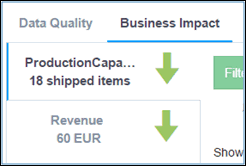
Measures are calculated by coefficients and rules added in the dqconfig.xml file.
For more information on how to add or edit measures or coefficients, see Creating and Modifying Dimensions and Measures in Omni Designer.