Starting the OmniGen Application
Data Quality Monitor (DQM) functionality is packaged in the xMC.war file.
Important: Before deploying, ensure that your Apache Tomcat configuration is ready to work with a regular xMC application deployment.
You can find the xMC.war file within the delivery directory (on FTP or via replication).
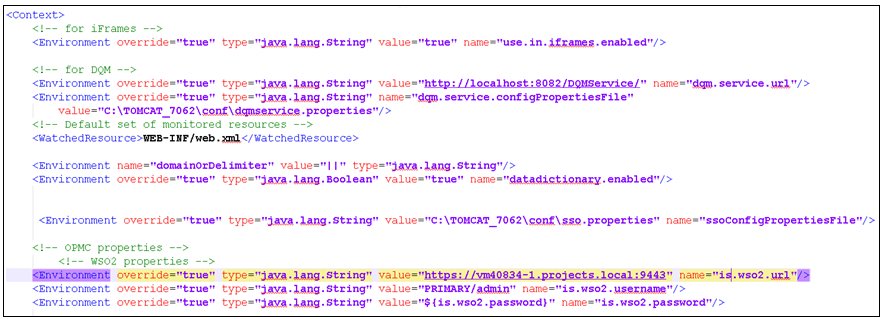
You must modify your context.xml file before deploying the xMC.war file.
- Navigate to the following Apache Tomcat directory:
\conf
- Edit the context.xml file using a text editor.
- Add the following new environment property:
<Environment override="true" type="java.lang.String" value="http://localhost:8080/DQMService/"
name="dqm.service.url"/>
- Save the context.xml file.
Your context.xml file should look similar to the following:
- Navigate to the Omni Console and then start OGC Tomcat from the OGC Services tab.
Important: Ensure to delete all temporary (deployed folders in \webapps) and DB files.
Ensure that Apache Tomcat does not generate any critical errors (warnings and debug messages are OK).
Note: If the OGC Tomcat service is running and you want to make changes to dqmservice.properties, context.xml, or the .war files, then you must first stop the OGC Tomcat service in the Omni Console.