Kerberos Troubleshooting
|
Topics: |
This section provides several troubleshooting tips for Kerberos.
- Ensure that you have properly configured the krb5.conf file.
The krb5.conf file is used to describe the Kerberos realm to be used for authentication and the location of the Key Distribution Center (KDC). This file has the following structure:
[libdefaults]
   default_realm = MYCOMPANY.COM
   udp_preference_limit = 1
[realms]
   MYCOMPANY.COM = {
    kdc = MYREALM.MYCOMPANY.COM
}
[domain_realms]
.MYCOMPANY.com=MYCOMPANY.COM
MYCOMPANY.com=MYCOMPANY.COM
In this example, the Kerberos realm is MYCOMPANY.com and the KDC is located at MYREALM.MYCOMPANY.COM. Additional mapping information is provided in the [domain_realms} section.
- Ensure that you have a properly configured the login.conf file.
The login.conf file is used to configure the authentication mechanism used by Java Authentication and Authorization Service (JAAS). This file has the following structure:
iWayHttpClient { com.sun.security.auth.module.Krb5LoginModule
  required
  // debug=true
  useKeyTab=true
  storeKey=true
  doNotPrompt=false;
};
In this example, iWayHttpClient is the name to be used by all iWay applications (for example, iSM). The com.sun.security.auth.module.Krb5LoginMobile entry instructs iSM to use the Kerberos 5 login module. If you want to debug the Kerberos authentication process, then uncomment the debug=true statement.
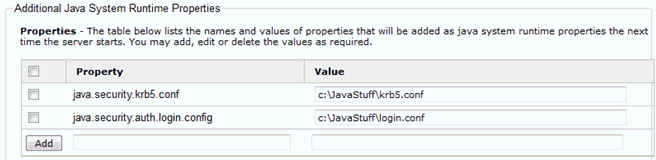
- Ensure that you specify the location of the krb5.conf and login.conf
files for your instance of iSM. You must provide the location of
the krb5.conf and login.conf files in the Additional Java System
Runtime Properties section of the iSM console.
- Ensure to specify which entry to use in the login.conf file.
You must specify which entry to use for the HTTP Pooling Provider
in login.conf, even if there is only one entry present. This is
configured in the HTTP Pooling Provider properties section of the
iSM console.

Resolving the Unable to Load Configuration File Error
You may encounter a "Could not load configuration file c:\Windows\krb5.ini (the system cannot find the file specified)" error message. For example:
[2011-11-16T12:37:40.998Z] ERROR (W.Retrieve_CRMChannel.1)
W.Retrieve_CRMChannel.1: [RequestTargetAuthentication - process()] -
Authentication error: Invalid name provided (Mechanism level: Could not
load configuration file C:\Windows\krb5.ini (The system cannot find the
file specified))
The following workarounds are available to resolve this error:
- Ensure that you properly configured the krb5.conf and login.conf files as described in this appendix. Also, ensure that you have properly specified their location in the Additional Java System Runtime Properties and pointed to the correct login.conf entry in the HTTP Pooling Provider properties.
- If this error is still generated after you have checked the properties described in step 1, then you must copy the krb5.conf and login.conf files to the <Java Home>\libs\security directory (on Windows) or <JavaHome>\etc (on Linux). Java looks for the krb5.conf and login.conf files by first checking if the location of these files has been explicitly listed. If for some reason (such as file permissions) Java cannot read the files in the location specified, Java then looks in the <Java Home>\libs\security directory. If the files are not found in this location, Java then defaults to c:\Windows\krb5.ini (for Windows), which results in the error message described above.